Showing posts with label film score. Show all posts

Thursday, April 22, 2010

{Audio Post: Score2_Theme}


Today we're going to work on a specific area of film scoring: the theme.

According to Wikipedia:

A theme (or "leitmotif") is "...is a phrase or melodic cell that signifies a character, place, plot element, mood, idea, relationship or other specific part of the film. It is commonly used in modern film scoring, as a device to mentally anchor certain parts of a film to the soundtrack."

Last time, we talked briefly about the example of Darth Vader from Star Wars and the theme music associated with him. Today, we're going to listen to another theme from Star Wars and work on creating our own themes for a specific scene from the movie.

"Why are we spending so much time talking about Star Wars?" you ask.

Because along with many other areas of film making, Star Wars had a major influence on the way other film scores were made after it came out. The composer, John Williams, is one of the most famous film composers in the history of cinema. One of the things that it made popular in modern movies was the idea of having themes in the score that are associated with specific characters and ideas. This is part of what makes the music so memorable and recognizable.

So, let's take a look to a few scenes:


What do you think this theme represents?
What kind of mood does it create in your mind?
Is it connected to a specific character or idea?
How is it put together or structured?
What kinds of instruments are used?

Now you are going to create your own theme for the Binary Sunset scene.

Please do the following:
  1. Look in Shared Media>Class Materials>Film Clips and find the file called StarWars_Binary Sunset.mov. Copy it to your computer.
  2. Launch Pro Tools and make a new Blank Session. Name it: your name_ForceTheme
  3. Import the Binary Sunset Quicktime movie into your session.
  4. Watch the clip a few times and think about how you are going to create a theme for it. What kind of mood? What kinds of instruments? Will the music change at a certain point? Feel free to listen to the original version if you need some ideas!
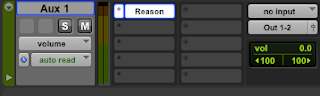
  5. Go to New Track and create a Stereo Aux Input track.

  6. Insert Reason on the Aux Track.
  7. Create a theme!
  8. Save.
  9. Bounce everything to a Quicktime movie. Name the file: your name_ForceTheme
  10. Put a copy on Shared Media in Student Work>Force Theme

Tuesday, April 20, 2010

{Audio post: Score 1_Scary}


One of the classic cases where a score is used to build up emotion is in a scary sequence when you know something bad is going to happen. You know it's coming, you know the character should do something different, but they're going to fall right into the trap! And the whole time, the music is building and building until...BAM!

Basically, whether you were consciously aware of it or not, the music just helped to manipulate you to feel a certain way, even though your brain already knew what was going to happen.

Question: what kinds of instruments do you typically hear in scenes like this? Why do you think those instruments are used so much?

Today, you are going to do this. Please do the following:
  1. In the Shared Media folder, look in Class Materials>Film Clips>Freddy Clips and copy the file called Chase.mov to your computer.
  2. Create a new Pro Tools session and name it: your name_scary score
  3. Import the Chase movie clip into your session.
  4. Watch the clip through a few times to get a feel for when specific things happen that should have a musical equivalent. Drop memory locators at these points.
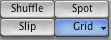
  5. Set the mode to Grid.
  6. Try to change the Tempo so that you can get some of the memory locators to fall right on the first beats of the grid.
  7. Create a Stereo Aux Input track.
  8. Insert Reason on this track.
  9. Make scaaaarrry music!
  10. Bounce the music to a Quicktime movie. Call it: your name_scary score
  11. Put a copy in the Shared Media Folder in: Student Work>Scary Score
  12. Save your Pro tools session.

Audio Post: Score

Last week we spent time focusing on and getting some experience working with sound FX. This week, we are going to turn our attention to another crucial part of audio post-production: the score. In case you forgot...

The score is the music that is created to go along with a film/video.

Wikipedia says:

"A film score is actually the background music of a film (which is generally categorically separated from songs used within a film). The term soundtrack is often confused with film score, but a soundtrack also includes anything else audible in the film such as sound effects and dialogue. Soundtrack albums may also include songs featured in the film as well as previously released music by other artists. A score is written specifically to accompany a film, by the original film's composer(s)...since the 1950s, a growing number of scores are electronic or a hybrid of orchestral and electronic instruments. Since the invention of digital technology and audio sampling, many low budget films have been able to rely on digital samples to imitate the sound of real live instruments."

What do you think is the purpose of the score? Why do we need music in movies?

Well, actually, not all movies have a score, or sometimes they use music very lightly. But most films have some kind of music to help enhance the emotions/moods of the different scenes. This can be important so that the audience has some direction on how to feel about what they are seeing.

For example, let's say you have a scene of a woman walking down the street. There is no dialogue in the scene, so we don't know exactly what she's thinking. Is she happy? Angry? Determined? Worried? Music can help us easier interpret what she is thinking without her saying a single word! Also, in scenes without dialogue, the absence of sound can make the scenes feel very slow and/or empty, so the music can help to move the story along.

Music can also be created to give specific characters their own themes. These themes usually come in throughout the movie whenever the character appears onscreen. A classic example of this would be Darth Vader's Theme (The Imperial March), composed by John Williams for the Star Wars movies: