Audio Effect
*An additional "thing" that is added to process or transform original sound.
Parameters
* "Knobs" & "Sliders" that already come with a particular sampler or synthesizer, or effect. Tells the instrument or effect how to behave.
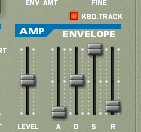
We'll first look at the parameter known as the ADSR Envelope. To my knowledge this is on every instrument based sampler and synthesizer in reason, but for this demonstration we'll be using the NN-19 digital sampler.
A.D.S.R. Envelope

Attack
How quickly the sound reaches full volume after the sound is activated (the key is pressed). For most
mechanical instruments, this period is virtually instantaneous. However, for some popular synthesized voices that don't mimic real instruments, this parameter is slowed down. Slow attack is commonly part of sounds called pads.
Decay
How quickly the sound drops to the sustain level after the initial peak.
Sustain
The "constant" volume at which the sound remains following the decay until the note is released. Note that this parameter specifies a volume level, not a time period.
Release
How quickly the sound fades when a note ends (the key is released). Often, this time is very short. An example where the release is longer might be a percussion instrument like a glockenspiel, or a piano with the sustain pedal pressed
I might be wrong-Radiohead
Reverb
Reverberation is the persistence of sound in a particular space after the original sound is removed. A reverberation, or reverb, is created when a sound is produced in an enclosed space causing a large number of echoes to build up and then slowly decay as the sound is absorbed by the walls and air.
* Causes effected instrument to have a spacious roomy feel.
* The original sound ceases but the reflection of the sound continues.
Reason has to types of reverb
-Digital Reverb
-Advance Reverb
Delay
*Used interchangeably with echo.
*Same sound repeated at different intervals of time until point of decay.
Dr.Octagon 3000
Exercise 1
*Create a 16 bar song with a melody and drum section.
-Utilize the ADSR Envelope on instrument sampler or synthesizer.
-Use Reverb on Redrum.
1) With the proper instrument highlighted in the instrument rack go to the Create menu and click the Digital Reverb.

-Use delay effect on last 8 bars of given sampler or synthesizer :
1) With the proper instrument highlighted in the instrument rack go to the Edit menu and click on "Duplicate devices and tracks".

2) Once this copy is created click on the duplicated device ,labeled "copy" on the side, and go to the Create menu and click the Digital Delay Line Effect.