Showing posts with label Do D.A.T.. Show all posts

Tuesday, March 9, 2010

Color Scheme remixes


Today we're going to be presenting our remixes of Dat's song, "Color Scheme".

In order to do this, everyone needs to put a copy of their Pro Tools session in the folder called Color Scheme_030910 on the Shared Media Drive. IMPORTANT: please also put a copy of your Reason beat inside the Pro Tools folder.

When you present...
Tell us a little bit about your work. How did you approach the song? Were you trying to get the same vibe as the original, or were you trying to switch it up at all? What kinds of instruments did you use and why? Did you do to the vocal tracks?

When you are listening/watching other people's presentations...
Please give your classmates feedback. I want you to send an email to the presenter's BAVC gmail account with at least 3 thoughts about their work. You can tell them things you like about what they did with the beat. You can also give them constructive criticism on what could be done to make the song even tighter.

Remember, the goal here is not to make people feel bad about their work, but rather to help each other improve our skills and build on our strengths.

Tuesday, March 2, 2010

{Do D.A.T. collabo_pt. 2}

Last week we got a chance to work with Do D.A.T. and do some recording on his song, "Color Scheme". This week we're going to take the Pro Tools session and make our own beats to do some remixes with him. Then we will work on properly mixing the vocals and, finally, bouncing out audio files to share with him next week.

Today, I want you to focus on the following:
  1. Preparing the session so that you can work with it. (Adjust the tempo, set up Grid Mode, copy the chorus)
  2. Making your beat

Preparing the session
There are a couple of things that you need to do with this Pro Tools session before you can jump into making a beat for it.

Tempo
First, we need to figure out a tempo for this track. We can do this by creating a Click Track and listening to how fast it is compared to the original beat. We then adjust the click until it is perfectly in time with the beat. I will demonstrate how to do this so that we can figure it out as a class. All you will need to do is change the tempo when you open the session on your computer.
For future reference though, this is how you do it

Using a Click Track to figure out the Tempo:
  1. Create a Click Track by going to Track>Create Click Track
  2. You should see a new Track called "Click" appear in the Edit Window.
  3. Hit play and listen to the song play back. You should hear a slightly annoying click that is out of time with the beat.
  4. Now let's change the Tempo. Double-click on the little red triangle in the left side of the Timeline. You should see this window pop up:
  5. As you listen to the song, start adjusting the BPM number in the Tempo Window. Hint: highlight the number and just press the Up/Down arrows on your keyboard.
  6. When you get the click happening exactly on the beat, click on the OK button to close the Tempo Change window.
Grid Mode
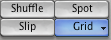
Now that we know the correct tempo, we can turn on Grid Mode and we should be able to make our edits exactly in time to the song. Click on the Grid button in the upper left corner of the Edit Window: You should now see a bunch of blue lines in the Edit Window, which means your grid is setup.
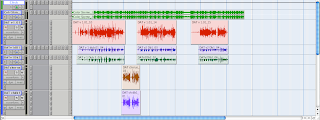
If you don't see the blue lines, you probably need to adjust the Grid settings. Ask an instructor for help.

Copying the Chorus
A really common technique (especially in hip hop) is to record the chorus vocals once and then copy them to all the different sections of the song where you want the chorus to be. This helps to give a really consistent feel to the hook, though it can also take away some of the flavor of the track.

To copy the chorus, do the following:

  1. Zoom in really close on the beginning of the chorus so that you can see the number of each Bar in the timeline.
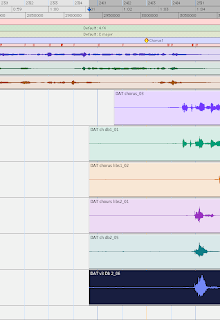
  2. See how some of these regions start at different points? Use the Trim Tool and adjust the beginnings of the chorus regions so that they all start at the same place (Ch1 = Bar 24/3).
  3. Zoom out so you can see the whole song. Look for where you think the next chorus will start.
  4. Now click on the Grabber Tool.
  5. Hold down Shift on your keyboard and click on each of the chorus regions one by one so that they are all highlighted.
  6. Let go of the Shift key and hold down the Option key. Click and drag the chorus regions roughly over to the start of the next chorus section.
  7. Zoom in on the second chorus section and move the regions so they all start at exactly the right point (Ch2 = Bar 48/3)
  8. Repeat steps 5-7 and put one more chorus at the end of the song (Ch3= Bar 72/3)

Make a Beat
Now that you've got all your Choruses in place, you should be ready to kick it off and start making a beat.

First, mute the original beat, the full song track and the Click Track.
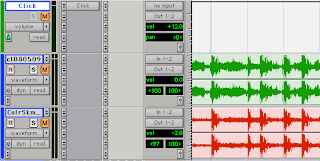
Now Create a Stereo Aux Input track and Insert Reason on it. (If you forgot how to do this, click here and scroll down to Step 7.) Make something cool!

Please don't forget to SAVE both the Pro Tools session AND your Reason beat. Save them both as: your name_Color Scheme

Thursday, February 25, 2010

{Do D.A.T. collabo_pt. 1}


Today we've got a special class where we are going to get a chance to really apply our engineering and production skills as we work with Do D.A.T.

Dat will be coming in to do a recording session with us. He has sent the instrumental for a new song from his upcoming album, Oakland In Blue. As a class, we are going to run the recording session for Dat to record his vocals over the track. The focus today is on engineering and helping Dat to record the best performance possible. I will be picking engineers at random for the different sections of the song, so everyone needs to be on point and ready to go, in case I call you!

At this point, everyone should be comfortable doing all of these technical tasks:
  • Setting up all the mics, cables, and headphones
  • Creating a new Pro Tools session
  • Creating and labeling audio tracks, including a Talkback track
  • Assigning the correct microphone inputs to the tracks
  • Setting good mic and headphone levels (NO CLIPPING!)
  • Recording and playing back the tracks
  • Saving the session
  • Transferring the session to the Shared Media folder.

In addition to all these basic technical tasks, a professional engineer (i.e. someone who is PAID to do this) must have some other skills as well, including:
  • The ability to make the artist feel comfortable
  • The ability to keep the session moving as smoothly as possible
  • The ability to give the artist feedback and help him/her make decisions about the performance
If you are selected to engineer today, I want you to really focus on your professional skills. It is an honor to have an artist like Dat come in and work with us, so I want for us to show him how him how professional we can be.

For those of you who are not engineering, I have a number of things that I need you to get done today. Priorities are:
  1. Update your BAVC profiles - upload an MP3 of at least one of your beats, add a picture, write something in your Bio
  2. Finish your remix of Rob's song - spend some time mixing (compress the vocal!!!), Bounce an audio file of the finished song
  3. Finish the Rewire Collabo assignment - finish it, mix it, bounce an audio file and give the audio file to your partner (the person whose drums you used)

Tuesday, February 9, 2010

Guest Speaker: Do D.A.T.

Today we have a special guest speaker, Mr. Davin "Do D.A.T." Thompson. D.A.T. is a performer, educator, and veteran of the Bay Area hip hop community. He is a founding member of the Oakland-based group, the Attik, and has shared stages with a number of hip hop legends, including Dead Prez, Mistah F.A.B., KRS One and E-40. He is the resident Lyrics Coach for BAVC's BUMP Records program. His new full-length album, Oakland In Blue, is set for release in Spring 2010.

D.A.T. is here to talk about how we can expand our perspectives towards creative projects in general and lyric writing in particular. Even if you are primarily a producer or engineer, rather than a lyricist, it is important to be able to project your understanding of art beyond what you do so that you can understand where people working in other areas are coming from. Please give Dat your attention today and make him feel welcome in our class!